Independent overview by Netops24 — not the official Auvik Networks website.
Cloud-Managed Network Monitoring
Auvik review — cloud-managed network visibility, priced per billable device
Auvik's cloud-managed network monitoring through a buyer's lens: which devices you pay for, how the Essentials and Performance packages scale to 1,000 devices, and what to prove in a 14-day trial.
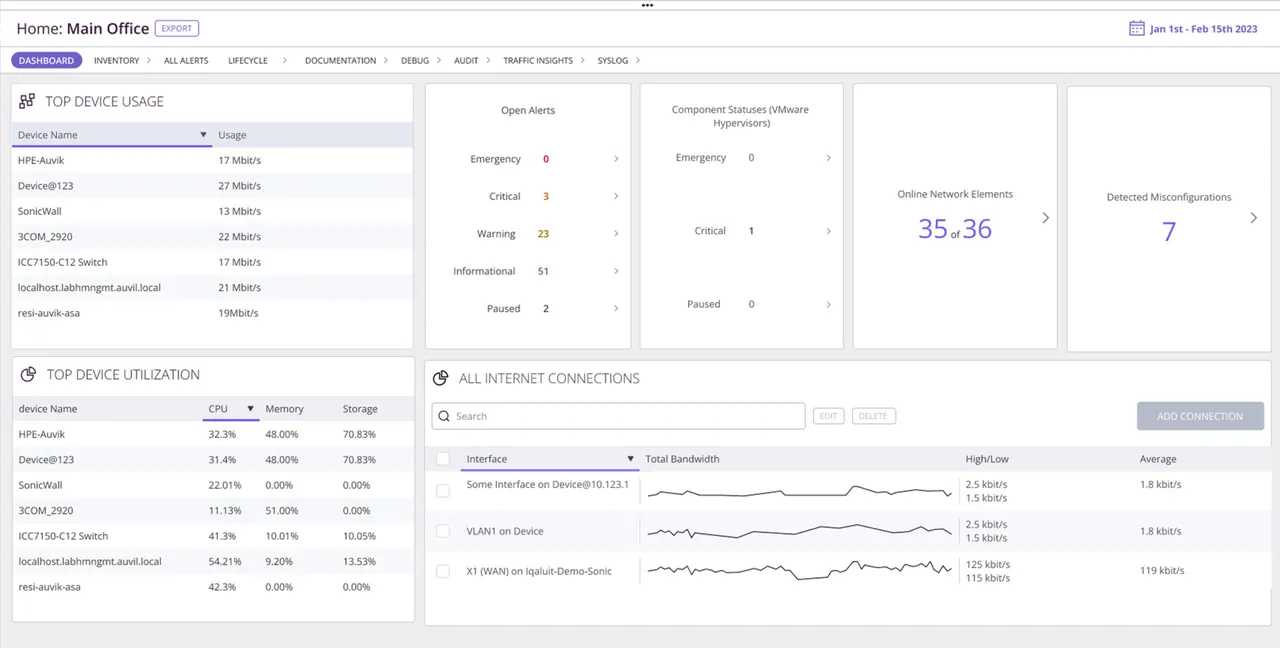
Picture the handover meeting at a company whose only network engineer just left: nobody has an up-to-date diagram, the switch passwords are in a spreadsheet, and the firewall config was last backed up “a while ago”. That is the situation Auvik is built for, and it explains both its appeal and its price. On a typical 45-device office network, or a 180-device, three-site retail estate, the useful questions turn out to be about which devices you are billed for and how long the value lasts once the map is drawn.
What it does
Auvik is a SaaS network monitoring and management platform. A lightweight collector runs on a Windows or Linux machine (or VM) inside each network, discovers devices over SNMP, LLDP, CDP, ARP and routing tables, and streams data to Auvik’s cloud. From there you get an automatically drawn, live topology map (layer 2 and layer 3), device inventory, interface and performance monitoring, alerting, and automated configuration backup for supported switches, routers and firewalls, with diff and restore. TrafficInsights adds flow analysis, and multi-tenant views make it popular with managed service providers.
Where it is strong
- Speed to understanding. Within an hour of the collector starting, buyers commonly report a topology map that reveals devices nobody documented — an unmanaged switch daisy-chained under a till counter is a typical retail find. That kind of discovery alone is often enough to justify the trial.
- Config backup built in. Automatic configuration backup with change history is included rather than sold as a separate product, which is unusual at this price point.
- Nothing to host. No monitoring server, no database, no upgrades to schedule. The collector updates itself.
- Multi-site and multi-tenant. One console, many sites, clean separation per client for MSPs.
Where it falls short, and who should skip it
- Network-first, not server-first. Server, application and virtualization monitoring are thin compared with PRTG or Checkmk. Organisations that need deep Windows or Linux server metrics will run a second tool.
- Opaque pricing. There is no public price list at the time of writing. You need a sales call to learn the number, which makes early budget planning harder.
- Data retention limits. As a SaaS product, historic data is kept for defined periods by data type. If you need multi-year trend data for capacity planning, confirm retention in writing.
- Customisation ceiling. Custom SNMP monitoring exists but is less flexible than on-premises tools that let you script anything.
- Skip it if the estate is mostly servers and applications with a handful of switches, or if policy forbids sending device configurations to a third-party cloud.
Who it suits
MSPs managing many small networks, and internal IT teams of one to five people with multi-site networks and little documentation. It is a strong fit where the network team is thin and the priority is visibility plus config backup rather than deep server telemetry.
Licensing and what it costs at 50, 250 and 1,000 devices
Auvik prices per billable device, per month, usually on an annual contract. Billable devices are network infrastructure: switches, routers, firewalls, wireless access points and controllers, and similar managed network gear. Endpoints such as laptops, phones and printers are discovered and shown on the map but, at the time of writing, are not billed. There are two packages, Essentials and Performance; Performance adds deeper flow and performance features. Prices are quote-based — check the vendor’s pricing page and the quote for current figures.
What that means at our three reference sizes:
- ~50 devices: if “devices” means everything with an IP address, the billable count may be only 10–15 (a firewall, a few switches, a handful of access points). This is where Auvik looks affordable.
- ~250 devices: a two- or three-site business might have 40–70 billable devices. Cost scales linearly with network gear, not headcount.
- ~1,000 devices: a campus network with hundreds of access points pushes the billable count high, and per-AP billing becomes the main cost driver. Ask about volume pricing and whether AP-heavy estates have special terms.
Hidden costs are modest: a small VM or spare machine per site for the collector, and staff time cleaning up SNMP credentials so discovery works. Lock-in is the real consideration: topology maps, config history and alert tuning live in Auvik’s cloud. Export device configs regularly if you want an exit path.
Running the 14-day trial
The trial is typically 14 days. Put the collector on your most confusing site first. Test: how complete the topology map is without manual fixes, whether config backup works for every vendor you run, how alerts route to your ticketing system, and how many devices are billable (the trial shows the count). Our 14-day trial plan was written with a tool like Auvik in mind.
How it compares
PRTG covers servers and applications better and can be self-managed; see Auvik vs PRTG. NinjaOne is the choice when endpoint management is the priority and network monitoring is secondary. The full SaaS field is in cloud-managed network monitoring, and the small-business shortlist puts it next to self-hosted options.
Getting it safely
Sign up for the trial on auvik.com, confirming the domain before entering company details. The collector package is served from within your Auvik dashboard after signup; verify its signature before running it, and give it read-only SNMP credentials to start. Our where to get it page explains what data trial forms typically ask for.
FAQ
Are servers billed?
At the time of writing, Auvik bills network infrastructure devices; servers and endpoints are discovered but not billed. Check the quote, as definitions can change.
Does the collector need inbound firewall rules?
No. It connects outbound to Auvik’s cloud, which keeps firewall changes simple.
Can we keep config backups if we leave?
You can export configs, but the change history lives in Auvik. Build a periodic export into your runbook from day one.
Is Auvik only for MSPs?
No. Its multi-tenant design suits MSPs, but single-organisation IT teams use it too.
Before you start a Auvik evaluation
Netops24 does not sell Auvik and hosts no files for it. Start your evaluation on Auvik Networks’s own site, check the address bar shows auvik.com, and read our where-to-get checklistfor what a trial sign-up normally asks for. Our verdict label is explained on the methodology page.