Independent overview by Netops24 — not the official NinjaOne website.
Cloud-Managed Network Monitoring
NinjaOne review — when network monitoring comes bundled with endpoint management
NinjaOne from a network-monitoring buyer's view: per-endpoint pricing, what the network management features cover, how cost scales from 50 to 1,000 devices, and what to test in the trial.
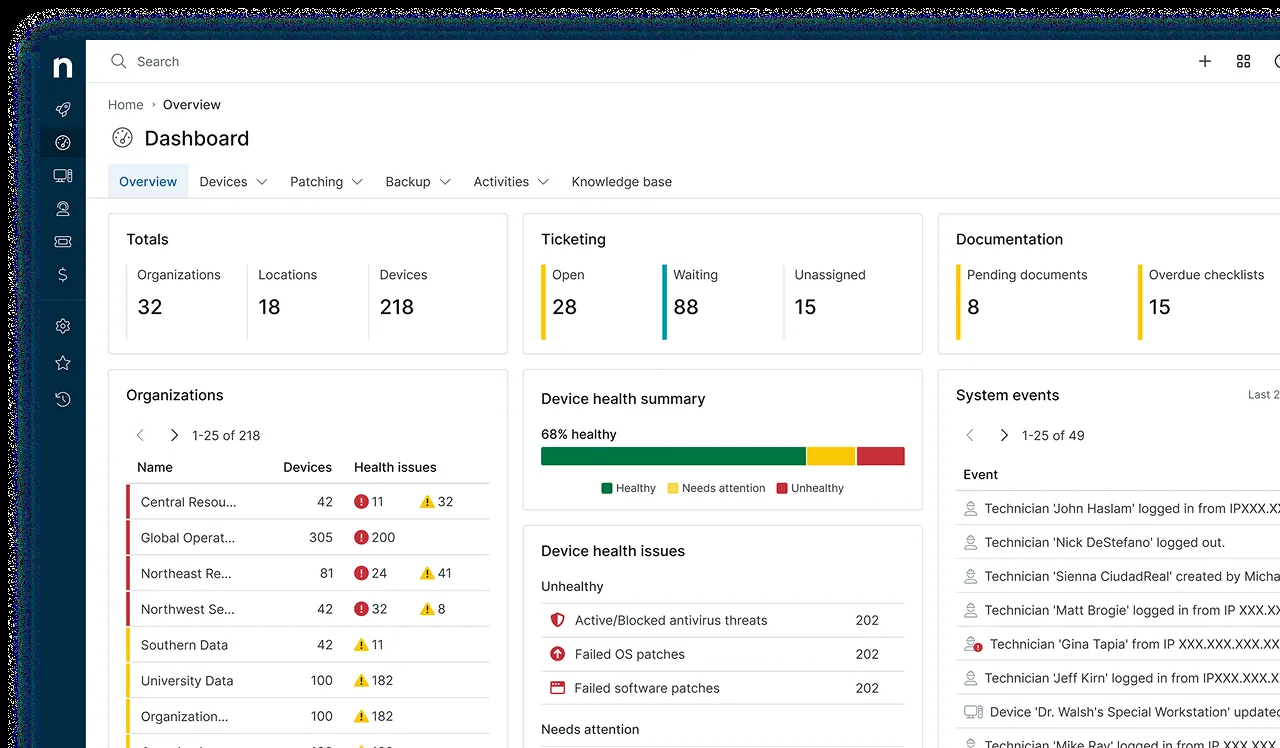
Some buyers do not start by looking for network monitoring at all. They start by replacing an ageing patching tool, and during the demo they notice NinjaOne can also poll the core switch and the firewall. The procurement question is then whether that built-in network monitoring is good enough to avoid a second product. Picture a typical 70-endpoint professional services firm with a dozen pieces of network gear: this review focuses on that question.
What it does
NinjaOne is a cloud-based RMM (remote monitoring and management) and endpoint management platform. Its core is an agent on Windows, macOS and Linux endpoints that handles monitoring, OS and third-party patching, scripting, software deployment, remote access and asset inventory. Its network management features add SNMP monitoring of switches, routers, firewalls and printers, NetFlow-based traffic visibility, network discovery and alerting, all polled through an agent-equipped machine on the local network. Optional modules include backup, ticketing and mobile device management.
Where it is strong
- One agent, one console. Endpoints and network devices appear in the same dashboard with the same alerting and ticketing workflow.
- Ease of use. The interface is one of the cleanest in the RMM market. Buyers commonly report new technicians becoming productive within a day.
- Patching and automation. Automated patching and script policies are genuinely good, and that is where most of NinjaOne’s value lies.
- Nothing to host. SaaS delivery means no server, database or upgrade cycle.
Where it falls short, and who should skip it
- Network monitoring is secondary. SNMP polling covers the basics — up/down, interface traffic, CPU and custom OIDs — but there is no automatic topology map comparable to Auvik’s and no depth comparable to PRTG or SolarWinds. Custom SNMP templates are typically slower to build than in dedicated network tools.
- Pricing is per endpoint, not per network device. If you only want to monitor network gear, you are paying for a platform built around endpoints.
- Quote-only pricing with minimums. There is no public price list at the time of writing, and minimum endpoint counts and annual commitments are common. Small shops may find the entry point higher than expected.
- Skip it if you need detailed network troubleshooting, config backup for multi-vendor gear, or long-term capacity trending. You will end up buying a dedicated network tool anyway.
Who it suits
Small and mid-size internal IT teams and MSPs whose main job is managing laptops, desktops and servers, with a modest network (a firewall, a few switches, some access points) that needs “is it up” monitoring rather than deep analysis. It suits organisations consolidating tools.
Licensing and what it costs at 50, 250 and 1,000 devices
NinjaOne prices per managed endpoint per month, quote-based, usually on an annual agreement; price per endpoint falls as volume rises. How network devices are counted and whether network management is included in the package should be confirmed on the quote — check the vendor’s pricing page and ask sales directly, because packaging has changed over time.
The mechanics at our reference sizes (counting endpoints, not network gear):
- ~50 endpoints: you may hit a minimum commitment. The network monitoring rides along, which makes NinjaOne look good value if you also need patching and remote access.
- ~250 endpoints: the per-endpoint rate typically improves. Budget backup or ticketing modules only if you will use them.
- ~1,000 endpoints: volume pricing applies and you have real negotiating leverage. At this size, check whether a dedicated network tool is still needed alongside — often it is, which adds a second line.
Hidden costs: optional modules (backup storage in particular grows with data), onboarding and policy design time, and — if network depth falls short — a second monitoring product. Lock-in is high in practice: policies, scripts, automations and ticket history all live in the platform, and switching RMMs means re-enrolling every endpoint.
Running the trial
NinjaOne offers a trial; at the time of writing it is typically 14 days — confirm on the signup page. Spend the first half on endpoints, then specifically test network features: add your core switch and firewall over SNMPv3, build one custom OID monitor, send a NetFlow export, and see how alerts reach your team. If that feels like enough, you may avoid buying a separate product. Our trial plan and requirements checklist help keep network needs on the agenda.
How it compares
Auvik is the network-first cloud alternative, with topology maps and config backup but little endpoint management. PRTG gives far deeper infrastructure monitoring but no patching or remote control. Many teams pair NinjaOne with one of them. See cloud-managed network monitoring and the small-business shortlist, and read pricing models explained for per-endpoint versus per-device maths.
Getting it safely
Start the trial on ninjaone.com and confirm the domain before entering company details. Agent packages are generated inside your own NinjaOne tenant; verify the digital signature before deploying them, and lock down technician accounts with MFA from day one, because an RMM console can run scripts on every managed machine. Our where to get it page has the details.
FAQ
Does NinjaOne replace a dedicated network monitoring tool?
For simple networks, often yes. For multi-site networks needing topology maps, config backup or deep traffic analysis, usually not.
Do network devices count as endpoints?
It depends on your agreement. Ask sales to state in writing how SNMP-monitored devices are counted.
Is there a minimum contract?
Minimum endpoint counts and annual terms are common at the time of writing. Negotiate them explicitly.
Can we monitor Linux and macOS?
Yes, agents are available for Windows, macOS and Linux, though feature depth is greatest on Windows.
Before you start a NinjaOne evaluation
Netops24 does not sell NinjaOne and hosts no files for it. Start your evaluation on NinjaOne’s own site, check the address bar shows ninjaone.com, and read our where-to-get checklistfor what a trial sign-up normally asks for. Our verdict label is explained on the methodology page.