Independent overview by Netops24 — not the official LizardSystems website.
Discovery & Troubleshooting Tools
LizardSystems Network Scanner review — a share inventory before you scope monitoring, with its age in plain view
LizardSystems Network Scanner as a pre-purchase tool: a Windows program that lists shared folders, FTP and web servers across your own IP ranges and checks access rights, free for personal use only and unchanged since July 2021.
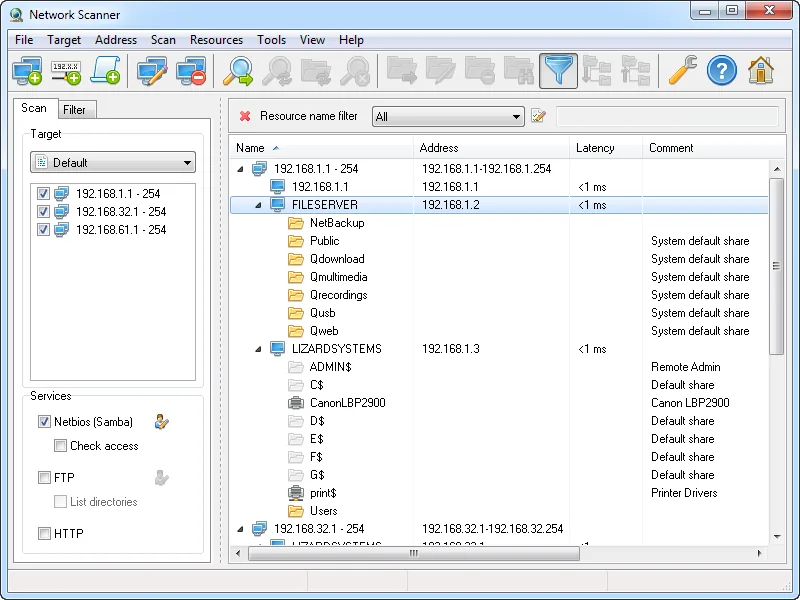
Picture the week before a monitoring vendor’s sales engineer asks which servers matter. Someone remembers two file servers, a NAS in the back office and “a web page on the UPS”. LizardSystems Network Scanner exists for that kind of question. It is a small Windows program that walks your address ranges and reports the shared folders, FTP servers and web interfaces it finds, plus whether the current user can read or write each one. For a buyer, that list turns “monitor the servers” into a named scope.
Use with authorization only. Scan only address ranges you own or are formally responsible for. On shared, leased or provider-managed networks, get written permission first, and tell your security team before you start: probing many hosts for shares can look like reconnaissance to an intrusion detection system.
What it does
The vendor describes Network Scanner as an IP scanner for analyzing networks. You give it IP ranges, individual addresses or computer names, including compact expressions such as 192.168.1-2,5,20,25-27.1-254, and it checks them in multiple threads. The vendor says the number of computers and subnets is unlimited and quotes “thousands of computers per minute”, a claim that depends on your timeouts and links.
For each host it can report:
- whether the host is online, tested by ping or by connecting to ports you specify, with a latency column and configurable retries;
- the NetBIOS or domain computer name;
- shared resources, including system and hidden NetBIOS (Samba) shares, along with FTP and web resources;
- read and write access for the current user, or for another account you specify.
Found resources can be opened in Explorer or a browser, or mapped as a drive. Results can be filtered by resource type or access rights, saved inside the program, and exported to HTML, TXT or XML. Scanning does not need administrator rights.
The online check is a reachability test, not a port scanner. The vendor does not claim service detection, MAC address or hardware vendor lookup, SNMP, IPv6 scanning or a command-line mode, so plan as if none of them exist.
Where it’s strong for a buyer
- Naming what needs watching. Many quotes break down by server role. A list of hosts that actually publish shares, FTP or an admin web page tells you which machines deserve disk, service and HTTP checks, and which are just clients. That feeds straight into a requirements checklist.
- Finding forgotten web interfaces. Printers, UPS cards, NAS boxes and older appliances often expose a web page. Each is a candidate for an HTTP check, and a device a vendor may or may not count as billable.
- An access-rights snapshot. Seeing which shares a standard account can write to is useful context when deciding what a file-server check should cover.
Where it falls short, and who should skip it
Age is the first issue. The latest release, v21.07, came out on July 7, 2021, and nothing has followed in more than five years. Windows 11 is not listed among supported systems; the list runs from Windows 7 to Windows 10 and Server 2016, with no Server 2019, 2022 or 2025. It may well run on newer systems, but that is unverified. Windows networking defaults have kept changing since 2021, and a tool that has not tracked them can under-report. A count you cannot fully trust is a weak basis for a quote.
Depth is the second. It will not tell you which services run on a host beyond shares, FTP and web, and without SNMP it cannot identify switches, firewalls or access points by make and model. Estates built mostly from network gear will get little from it; Angry IP Scanner gives a broader cross-platform sweep with port columns.
Who it suits
- Windows-centric offices that want a list of file servers, NAS devices and web consoles before writing a monitoring scope.
- Admins tidying up shares ahead of a trial and wanting a read/write view from a standard user’s point of view.
Licensing and cost
At the time of writing, LizardSystems offers a free Personal License for non-commercial use and a Business License at US$79.95, described as a perpetual licence per machine with one year of updates and email and ticket support. Check the vendor’s purchase page for the current figure. The FAQ says each installation on a separate machine needs its own licence. That count is of machines running the scanner, not devices scanned, so 50, 250 or 1,000 devices all cost the same on one admin workstation; two admins scanning from their own PCs means two licences. Volume and site licensing are offered by direct contact, with no published discounts.
The evaluation terms need care. The FAQ describes an unregistered version with no functional limits during an evaluation period, on one computer, with nag screens; the company page says every product has a 30-day evaluation; the product page leads with “free for personal use”. Read the current licence page before any work use. The hidden cost is time: scanning, tidying the export and confirming results on an unlisted Windows version.
How it compares
It is narrower than the other tools in the discovery and troubleshooting shortlist. Angry IP Scanner is the better general device count; this scanner adds share names and access rights. Neither explains a strange trial result on the wire; that is Wireshark’s job. Paid platforms such as PRTG, Auvik and OpManager discover far more once a trial runs, and LibreNMS is the free route to persistent SNMP discovery. Our pricing models guide shows how an inventory like this becomes a quote.
Getting it safely
Get it only from lizardsystems.com, typed yourself or via the link on this page, and avoid bundled copies elsewhere. The vendor publishes a SHA-256 hash for the v21.07 release on its product and release pages; compare it with Get-FileHash in PowerShell, and check the file’s digital signature where one is present. Our where to get it safely page has the steps.
FAQ
Does it scan ports like a port scanner?
No. It can test whether a host answers on ports you name, as an online check, but it does not enumerate services. It focuses on shares, FTP and web resources.
Will it run on Windows 11?
Windows 11 is not listed among supported systems, and there has been no release since July 2021. Test it on a non-critical machine first.
Can I use it at work without paying?
The personal licence covers non-commercial use only. Business use needs a paid per-machine licence; check the vendor’s evaluation terms before running it on a company network.
Is it a monitoring tool?
No. It is a snapshot with no history or alerts. Use it to scope a purchase; our methodology explains how we judge the platforms.
Before you start a LizardSystems Network Scanner evaluation
Netops24 does not sell LizardSystems Network Scanner and hosts no files for it. Start your evaluation on LizardSystems’s own site, check the address bar shows lizardsystems.com, and read our where-to-get checklistfor what a trial sign-up normally asks for. Our verdict label is explained on the methodology page.