Independent overview by Netops24 — not the official SolarWinds website.
Enterprise Network Monitoring
SolarWinds NPM review — what the node-based subscription really buys an enterprise
A procurement-focused look at SolarWinds Network Performance Monitor: node-based licensing, the Windows and SQL Server bill underneath it, scaling to 1,000 devices, and the security questions your review board will ask.
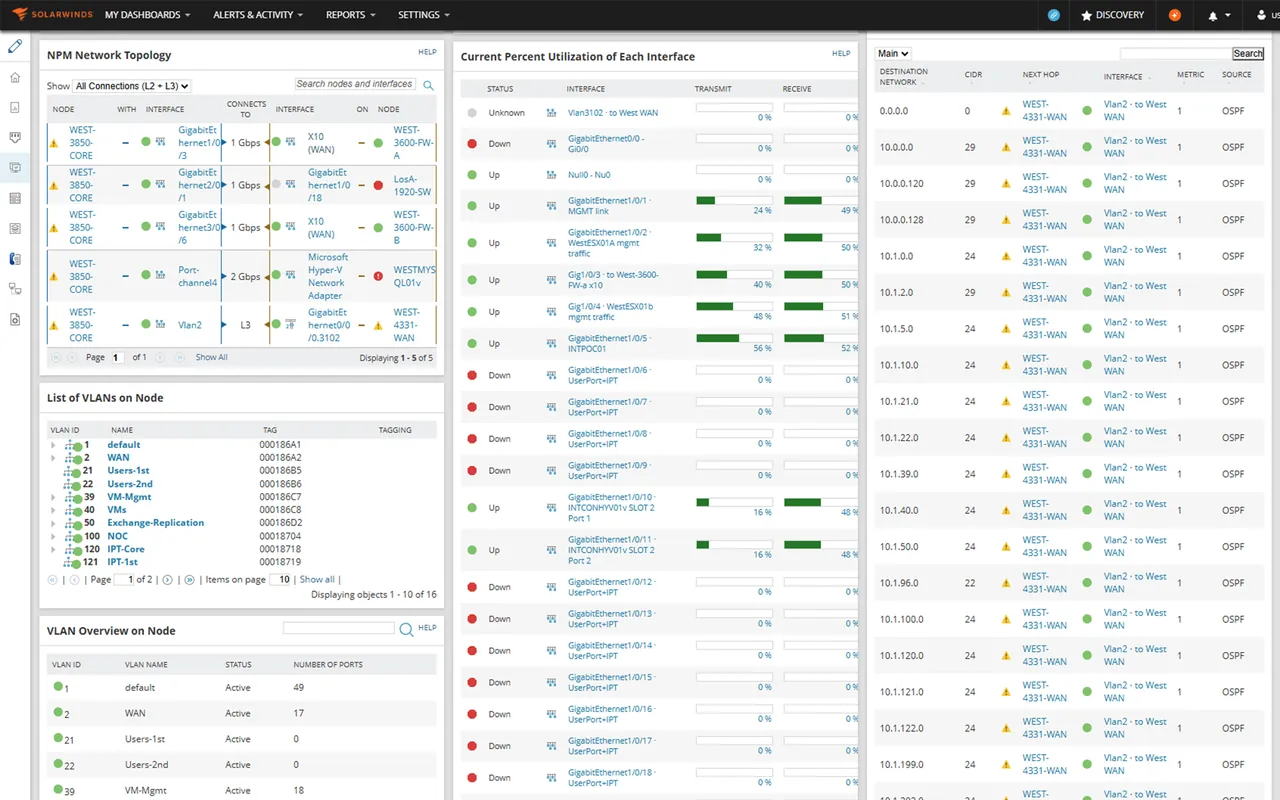
SolarWinds NPM rarely arrives on a shortlist by accident. Usually a network lead has used it at a previous employer, trusts NetPath and the Orion-style dashboards, and wants it again. Procurement’s job is to find out what the licence costs once the database server, the extra polling engines and the security review are added in. Picture a typical 30-day evaluation against a lab of roughly 400 nodes — Cisco, Aruba and Fortinet gear plus a vSphere cluster — and this review focuses on that total.
What it does
Network Performance Monitor polls routers, switches, firewalls, wireless controllers and load balancers over SNMP, ICMP and vendor APIs, then presents availability, interface utilization, errors, discards and hardware health. Stand-out features include NetPath (hop-by-hop path visualization toward a service, including hops outside your network), PerfStack (dragging metrics from different layers onto one timeline to correlate them) and auto-generated network topology maps. It sits on the SolarWinds platform, so it shares a web console, alerting engine and database with sibling products such as NetFlow Traffic Analyzer, Network Configuration Manager and Server & Application Monitor.
Where it is strong
- Depth on network devices. Interface-level statistics, hardware sensors and vendor-specific MIBs are covered in more depth than most generalist tools manage.
- Troubleshooting workflow. PerfStack and NetPath shorten the “is it the network?” argument. Tracing a latency spike to a single saturated WAN link is the kind of task they are designed to resolve in minutes rather than hours.
- Scale. Additional polling engines spread load, and large deployments with many thousands of nodes are well documented.
- Ecosystem. Config backup, flow analysis, IP address management and server monitoring are available from the same vendor on the same console.
Where it falls short, and who should skip it
- Infrastructure overhead. The self-hosted platform runs on Windows Server with Microsoft SQL Server behind it. At a few hundred nodes, SQL Server Express limits are quickly outgrown, so a Standard licence (and the DBA time to size it) enters the budget.
- Module sprawl. The features people remember from demos are often in separate products. Flow analysis and config management typically show up as separate line items on the quote.
- Upgrades take planning. Platform upgrades touch every module and the database. Budget a maintenance window and a rollback snapshot for each one.
- Security due diligence. The 2020 supply-chain compromise of the Orion platform is a matter of public record. SolarWinds has since rebuilt its build pipeline and publishes its secure development practices, but expect your security team to ask for evidence, and allow time for that review.
- Skip it if you have under 100 devices and no dedicated network engineer. The platform’s weight is hard to justify at that size.
Who it suits
Mid-size and large organisations with a network team of three or more, multi-vendor hardware, WAN links worth troubleshooting in detail, and an existing Windows/SQL Server operations practice. It also fits organisations that already own other SolarWinds modules and want one console.
Licensing and what it costs at 50, 250 and 1,000 devices
SolarWinds has moved buyers toward node-based subscriptions sold within its SolarWinds Observability Self-Hosted packaging; a node is broadly one monitored device. Older NPM licences used “element” tiers, where nodes, interfaces and volumes each counted against the limit; some customers still renew on that model. Exact prices are quote-based at the time of writing — check the vendor’s pricing page and request a formal quote.
How the mechanics play out:
- ~50 devices: the licence is the smallest line item. The Windows Server host, a SQL Server instance and the setup time dominate, which is why small teams often find NPM expensive per device.
- ~250 devices: node count drives the subscription. One polling engine usually suffices; plan a proper SQL Server licence and 8–16 GB of RAM for the database.
- ~1,000 devices: expect an additional polling engine or two, a larger database server with fast storage, and often a separate web server. Negotiate multi-year terms here; discounts are real at this size.
Hidden costs to budget for: SQL Server Standard licensing, a second Windows Server for polling engines, add-on modules for flow and config, training for the team (the platform has a learning curve), and upgrade windows. Lock-in is high: custom alerts, reports and PerfStack projects are platform-specific.
Running the 30-day trial
The evaluation runs 30 days with the full feature set. Test three things: whether NetPath and PerfStack actually shorten troubleshooting on your real WAN, how the database behaves when you point the evaluation at all your nodes (not a sample), and how long an upgrade between versions takes. Our trial plan and requirements checklist will keep the evaluation honest.
How it compares
PRTG covers similar ground with a lighter footprint and sensor-based pricing — see PRTG vs SolarWinds. ManageEngine OpManager is the usual price challenger at the 250–1,000 device mark, and Checkmk appeals to Linux-first teams. For the full enterprise shortlist see enterprise network monitoring, and the pricing mechanics behind all of these are in network monitoring pricing models.
Getting it safely
Request the evaluation only from solarwinds.com while signed in to a SolarWinds customer portal account, check that the package carries a valid SolarWinds digital signature, and compare published hashes where the vendor provides them. Given the platform’s history, keep the evaluation server segmented from production credentials until your security team signs off. Our where to get it page has the checklist.
FAQ
Do interfaces count toward the licence?
On node-based subscriptions, generally no — you pay per device. On legacy element licences, interfaces and volumes count separately. Check which model the quote uses.
Can we buy perpetual licences?
SolarWinds has been steering customers toward subscriptions. Ask your account manager whether a perpetual option still exists for your region and product.
Is there a SaaS version?
SolarWinds offers a SaaS observability product alongside the self-hosted platform. Feature parity with NPM differs, so compare them item by item.
How much staff time does it need?
As a rough estimate, a 400-node deployment needs a few hours a week of care once stable, plus about a day per major upgrade.
Before you start a SolarWinds NPM evaluation
Netops24 does not sell SolarWinds NPM and hosts no files for it. Start your evaluation on SolarWinds’s own site, check the address bar shows solarwinds.com, and read our where-to-get checklistfor what a trial sign-up normally asks for. Our verdict label is explained on the methodology page.